Performance
How many records per second can the cluster sustain before latency degrades? Where is the capacity limit?
Open source · Apache Kafka · Kubernetes
You find out how a Kafka cluster handles a broker failure on the day a broker fails, unless you have already tried it. Kates puts load on Apache Kafka, injects faults into its brokers, measures what they cost in throughput, P99 latency, recovery time and lost records, and audits broker security configuration.
$ kates health
✓ Kates API      http://localhost:8080   v1.0
✓ Kafka          krafter.kafka           3 brokers · 3 zones

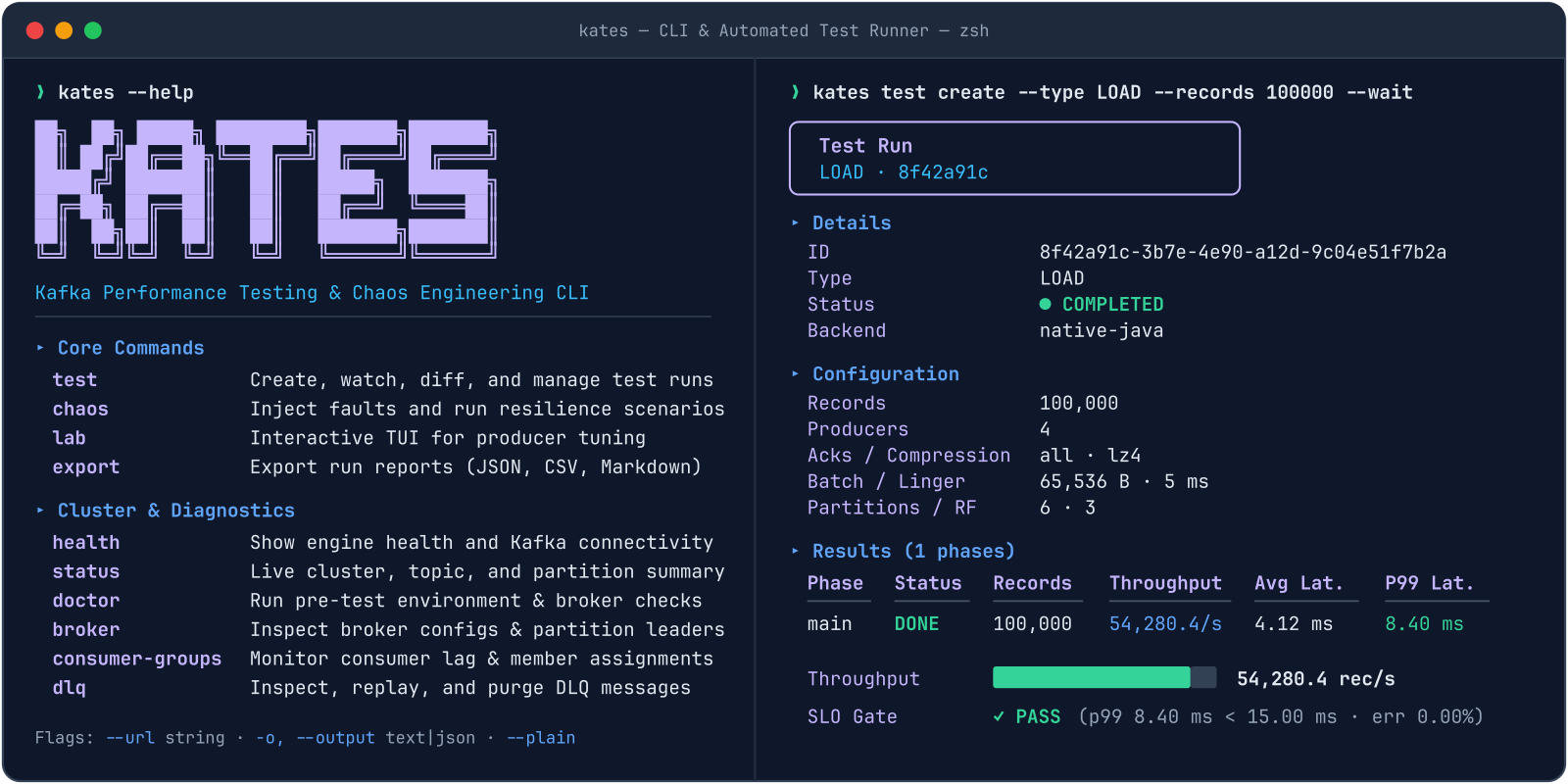
$ kates test create --type LOAD --records 100000 --wait
test  7f3a…  LOAD  running ████████████████████ 100%
throughput   48,112 rec/s
P50 / P95 / P99   3.1 / 9.4 / 17.8 ms
errors       0          grade  A

$ kates resilience run --type LOAD --fault broker-pod-kill
fault        broker-pod-kill → krafter-kafka-1
before/after P99   17.8 → 41.2 ms   (+131%)
recovery     6.4 s      lost records  0

$ kates gate --min-grade B
PASS grade A ≥ B exit 0Why Kates
A perf-test script in one window, kubectl delete pod in another, and a Grafana board
someone eyeballs. Kates turns those checks into tests you can repeat, run in a pipeline and
grade against targets you set.
How many records per second can the cluster sustain before latency degrades? Where is the capacity limit?
What happens to in-flight messages when a broker dies? Does the cluster recover from a network partition within the SLA?
Is there any data loss under cascading failures? Are ordering and exactly-once guarantees kept under stress?
What it does
Eight workload types: LOAD, STRESS, SPIKE, ENDURANCE, VOLUME, CAPACITY, ROUND_TRIP and INTEGRITY. Real Kafka producers and consumers on virtual threads, or hand the workload to Trogdor.
Thirteen disruption types, from broker pod kills and network partitions to CPU, memory and I/O stress, DNS errors, disk fill and node drain, executed through LitmusChaos or a direct Kubernetes provider.
Pair one load test with one fault and get the before/after change and the recovery time. Or run multi-step disruption plans with ISR and consumer-lag tracking and an A–F SLA grade.
Grade broker configuration A–F. Map the checks to CIS, SOC 2 and PCI DSS, save a baseline and report drift from it on the next run.
Exit non-zero below a minimum performance or security grade, or when a scenario file violates its SLA. Webhooks notify your pipeline when a test finishes.
A three-node Kind cluster whose nodes sit in separate zones, each with its own StorageClass and broker pool, with rack awareness on. Rehearse a full zone failure on a laptop.
Quick start
You need Docker, Kind, kubectl and Helm, and about 16 GB of RAM. Everything else,
Strimzi, Kafka, Prometheus, Grafana, LitmusChaos and the Kates API, is installed by
kates deploy.
panda.--dry-run to see the plan first.# 1. The CLI (macOS or Linux)
brew install bmscomp/tap/kates
git clone https://github.com/bmscomp/kates && cd kates
# 2. A three-zone Kind cluster named panda
make cluster
make kates-native
# 3. The stack: Strimzi, Kafka, monitoring, chaos, Kates API
kates deploy
# 4. Port-forwards and a ready CLI context
kates ports
# 5. A first load test, then a CI gate
kates test create --type LOAD --records 100000 --wait
kates gate --min-grade C --records 100000- uses: bmscomp/kates@v1
with:
api-url: ${{ secrets.KATES_API_URL }}
api-key: ${{ secrets.KATES_API_KEY }}
min-grade: BArchitecture
Performance tests work against any Kafka cluster the Kates API can reach. Fault injection targets Strimzi-managed brokers. Every run is stored, so the numbers from last month are there to compare with today's.
Compared with the usual workflow
| Capability | kafka-producer-perf-test |
OpenMessaging Benchmark | Manual Litmus / kubectl |
Kates |
|---|---|---|---|---|
| Load, stress, spike and round-trip workloads | Producer or consumer only | Yes | No | Yes |
| Coordinated fault injection under load | No | No | Manual | Yes |
| Blast-radius guard and rollback | No | No | No | Yes |
| Zero-loss, ordering and gap verification | No | No | No | Yes |
| Broker security and compliance audit | No | No | No | A–F · CIS / SOC 2 / PCI DSS |
| Repeatable CI gates and historical trends | No | No | No | Yes |
name: checkout-peak
type: LOAD
records: 2000000
producers: 8
gates:
  minThroughput: 40000      # rec/s
  maxP99LatencyMs: 25
  maxErrorRate: 0.001
disruption:
  type: broker-pod-kill
  maxAffectedBrokers: 1
maxRecoverySeconds: 30$ kates test apply -f scenario.yaml --wait
PASS throughput 47,902 ≥ 40,000
PASS P99 19.6 ms ≤ 25 ms
PASS recovery 8.1 s ≤ 30 s
PASS lost records 0
grade A · junit → reports/checkout-peak.xmlCI gates
Describe a workload and its SLA in a scenario file. Kates runs it, injects the fault, checks every gate and exits non-zero when one fails. The same file runs on a laptop and in the pipeline, and every run lands in PostgreSQL so a regression shows up as a trend, not a surprise.
kates gate --min-grade B for a one-line performance gatekates security gate for the broker configuration gradebmscomp/kates, ready to drop into a workflow
Kates is free and open source. Install it, point it at a cluster, and read the first graded report in minutes.
brew install bmscomp/tap/kates